
Image Deconvolution and Visualization Software
Make any widefield fluorescence microscope capable of creating confocal quality images in seconds!
AutoQuant X3 is the life science industry’s leading image deconvolution software. Retrieve better data from your images using
the most complete suite of 2D and 3D restoration algorithms available, including the industry’s best blind deconvolution algorithm. Microscopy experts worldwide trust AutoQuant X3 for the accuracy and beauty of its stunning quantitative results, while newcomers to the product love the user-friendly workflow and intuitive interface that helps make learning a breeze. Today’s computing power allows images to be deconvolved in minutes and even seconds.
If you own a FLUORESCENCE MICROSCOPE you need AutoQuant X3. If you own a CONFOCAL MICROSCOPE you need AutoQuant X3. Let us show you why you’re missing out on having show stopping fluorescence images!
A built-in 5D viewer allows stunning display and easy movie creation.
AutoQuant software has been on the market over 20 years! Windows based computer processors can finally take advantage of the power of deconvolution.
Try AutoQuant X3 out FREE for 14 days.
Powerful image analysis software is the secret to great discoveries in any field. We have been customizing AutoQuant X for over 20 years! Let us prove it to you.
We will not only give you the software to use, but we’ll give you the grand tour FREE.
(281) 579-0342
Extensive Algorithm Selection
3D Deconvolution
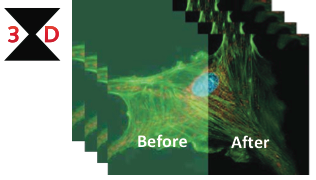
Blind:
- Adaptive Point Spread Function (PSF)
- Entire Volume + Channels + Time
- Constrained Iterative
- Noise Reduction
Non-Blind:
- Fixed Point Spread Function (PSF)
- Entire Volume + Channels + Time
- Constrained Iterative
- Noise Reduction
2D Deconvolution
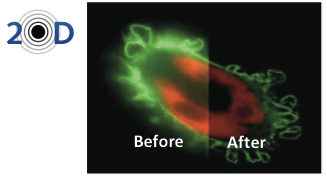
Blind:
- Adaptive Point Spread Function (PSF)
- Entire Volume + Channels + Time
- Constrained Iterative
- Noise Reduction
Non-Blind:
- Fixed Point Spread Function (PSF)
- Entire Volume + Channels + Time
- Constrained Iterative
- Noise Reduction
Intuitive Four-Step Process
AutoQuant X3 is truly the most intuitive deconvolution software in the industry, using a simple yet elegant workflow to direct any user through the necessary steps to achieve repeatable image restoration.
PSF Modeling Algorithms
The newest Gibson & Lanni modeling algorithms refine your theoretical PSF for stunning results.
Microscopy Modalities
Work with all widefield, brightfield, spinning disk & laser scan confocal, and multi-photon image sets.
Automatic SA Correction
Tune your optical system’s unique theoretical PSF with spherical aberration detection and correction.
PSF Refinement
Create an optimal PSF iteratively derived from an entire volume of beads with just a single click.
Multi-Time / Channel Support
Load, view, and control multiple channels and timepoints to create vibrant multidimensional results.

Easily Capture Single-Frame Images & Time-Lapse Experiments
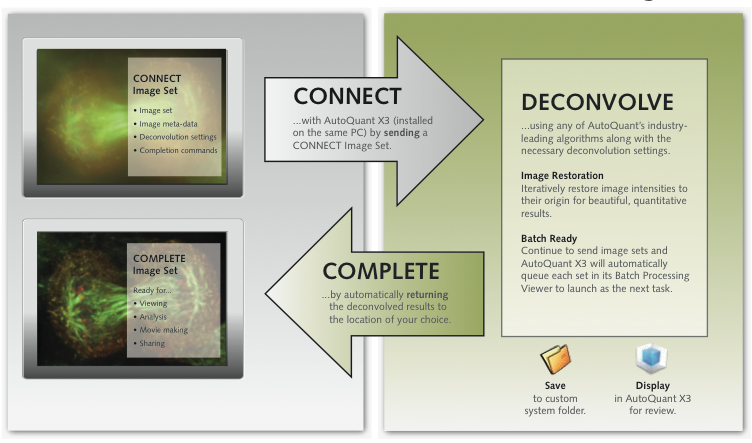
Media Cybernetics® understands that AutoQuant X3’s impressive deconvolution capability is but one key aspect of your imaging workflow. Sample preparation, image acquisition, deconvolution, processing, analysis, and storage solutions must all function seamlessly and effectively. For this reason, AutoQuant X3 implements the newest, most sophisticated workflow accelerator available for single-user workstations, connecting many of your imaging software applications without additional effort.
From your partnering software application, a single click can trigger an automatic connection with AutoQuant X3 (installed on the same PC), send the active CONNECT Image Set, deconvolve the set using any of AutoQuant’s industry-leading algorithms, and complete the connection by returning the image set to the partnering software application.
Extensive Algorithm Selection
Deconvolution Tools
- ROI deconvolution preview quickly tests for optimal settings.
- Save optical parameters and deconvolution settings.
- Batch-process your image sets sequentially in an instant or on a timer.
- Spacing calculator computers the optimal XY and Z optical spacing.
Image Correction
- Stabilize your sample using:
- Slice-to-slice alignment
- Channel-to-channel alighment
- Advanced cropping and reshaping
- Image correction tools for photobleaching, attenuation, optical density variability, and many other imaging problems.
Visualization
- View 5D datasets (X, Y, Z, time, and channel)
- Display multiple viewers simultaneously
- Multiple volume projection modes (max, min, and sum projections)
- Slicer view compares XY, YZ, XZ, ortho, and oblique slice views
- Surface-render objects to measure individual volumes
- Synchronize multiple viewers for easy comparison
- Movie Maker and Save to AVI Movie for easy sharing of results
- Individual channel controls for brightness, contrast, and gamma
- Sync multiple line profiles and measurements to facilitate comparison
Analysis Tools
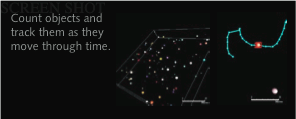
Counting and Tracking
Count and track a virtually limitless number of objects through time. Load and process 3D time-series datasets. Utilize powerful and intuitive preprocessing tools. Once counted, objects can be tracked and displayed using easy- to-follow tracking lines for a vivid, graphic depiction of the objects’ activities. Export complete data measurements to a spreadsheet for later analysis.
Ratiometrics
Study the effects of differing concentrations of calcium or shifting pH values on a standard sample environment. Employ the Grynkiewicz equation for ion concentration and produce accurate results with visually emphasized color mapping. Use pre- and post-processing steps such as automatic alignment, noise removal, and Gaussian smoothing for cleaner resultant images. Use ROIs and threshold controls to obtain statistics about relative changes within datasets.
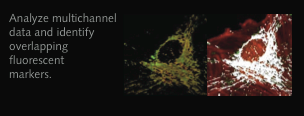
Colocalization
Easily analyze sections where two or more dyes overlap. Identify overlapping areas, display them, and generate statistics for user-selected ROIs. Easily load a multichannel dataset, create an intensity mask to display colocalized areas, and generate a new “colocalized” dataset displaying only areas with colocalization. Work with algorithms such as Pearson’s correlation coefficient and Manders’ overlap coefficient; then generate and export the resultant statistics to .csv format.
FRET
AutoQuant X3’s proprietary algorithm for measuring protein- to-protein interactions stems from the two most commonly accepted algorithms, Elangovan & Periasamy and Gordon & Herman, to correct for crosstalk. This algorithm goes one step further by using our sophisticated Maximum Likelihood Estimation algorithm to mathematically solve for crosstalk, generating more accurate results and analysis. Easily create as many ROIs as you desire, run statistical analyses on those ROIs, and export the results.
Measure and Quanity
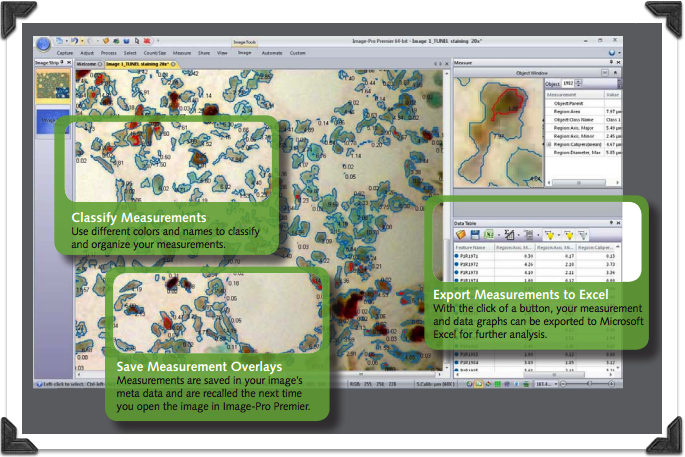
Extract quantifiable data from your images with a variety of measurement tools. Easily measure distances, regions, angles, and more.
Overview
Get Started with Free Video Tutorials
As an AutoQuant X3 user, you’ll have access to a growing library of free 3- to 5-minute video tutorials. Learn time-saving tips and familiarize yourself with a wide range of preprocessing techniques, deconvolution algorithms, and application-specific analysis tools available to you – without ever having to leave your computer.
AutoQuant Users Email List
When you choose AutoQuant X3 software, you instantly join a community of image analysis professionals. Join the free AutoQuant users email list to ask questions and learn from other users.
Join today at http://listserv.mediacy.com.
Technical Support
Register your copy of AutoQuant X3 to receive 90 days of complimentary technical support. Receive installation and configuration troubleshooting from our technical support engineers via phone, email, or Skype®. Extend your technical support beyond 90 days to receive expert support year-round.
Automatic Updates
Download the latest updates for your AutoQuant X3 software right from within your product. With a high-speed internet connection you’ll always be on the cutting edge of deconvolution technology.
Supported Operating Systems:
Microsoft Windows XP® SP 3 and later – 32 bit
Microsoft Windows® 7 Professional and Ultimate – 32 and 64 bit
Recommended Requirements
• Processor: Intel quad-core 64-bit processor (current recommended model: CoreTM i7-2600) or better
• RAM: 8 GB memory or higher
• Free disk space: 2 GB on installation drive plus dedicated data drive (500 GB or higher)
• OS: Windows 7 (64 bits)
• Graphics card: NVIDIA Quadro® 600 or better
Minimum Requirements
• Processor: Intel® dual-core processor
• RAM: 3 GB memory
• Free disk space: 2 GB on installation drive plus free space for images (20 GB or higher)
• OS: Microsoft® Windows XP® (32 bits) or Windows® 7 (32 or 64 bits)
• Graphics card: NVIDIA® graphics card (for 5D viewer performance)